


Spanish English Translator
4.45.00K Reviews
App Specs
- Version
- 4.10017
- Updated On
- License
- Free
- Downloads
- 1,000,000+
- Developer
- HeapSol Technologies, Inc
- Categories
- Books & Reference
- Platform
- Android
Screenshots
 Analysis by AppCompare
If you need to move between Spanish and English without turning every small question into a search session, Spanish English Translator has a clear purpose: it is a free reference app for translating in both directions. I find that kind of focused tool most useful when I want to understand a short phrase quickly, then get back to what I was doing. It is less suited to situations where every word needs professional-level nuance, but for everyday comprehension, the basic idea is appealing.
What free access means in practice
The app is free, so there is no purchase decision to weigh before trying it. That makes it easy to keep as a backup, especially if you only need translation now and then. I would not confuse “free” with a guarantee that every possible feature or use case is covered; the practical value depends on whether its Spanish-English focus matches what you actually need.
HeapSol Technologies, Inc is the developer. The app has a 4.4 average from around 15,000 ratings, and it has been installed over a million times. Those figures suggest that many people have tried it, but they cannot tell me whether a particular sentence will translate naturally. I would use them as context, not as a substitute for checking important wording.
A focused tool rather than a language course
As a Books & Reference app, Spanish English Translator is best approached as a lookup aid, not as a structured way to learn Spanish. It can help me bridge a language gap when reading or composing a short message, but translation alone does not explain why a phrase is formed a certain way. If I want lessons, grammar practice, or a planned study routine, I would choose a dedicated learning app alongside it rather than expect this translator to teach those skills.
That distinction matters when deciding whether it offers enough value. Someone who needs occasional help understanding a sign, a menu, or a simple note may get plenty from a free, two-language tool. A learner who wants progress tracking, exercises, or detailed explanations should look for those specific features elsewhere. I would keep the translator for quick assistance and use learning resources for the work of building fluency.
Where it fits among translation options
Compared with opening a general web search or a broader translation service, a dedicated Spanish-English app can feel more direct when this is the language pair I use repeatedly. I do not have to treat every lookup as a new research task; the app’s narrow purpose makes it a straightforward option to try. On the other hand, a broader service may be more convenient if I regularly switch among several languages or need extra tools in one place.
For a short, low-stakes phrase, a quick translation can be enough to keep a conversation moving. For a contract, medical instruction, formal business message, or anything where a subtle error could matter, I would not rely on an automatic translation as the final authority. I would ask a fluent speaker or a qualified translator to check the wording. That is not a weakness unique to this app; it is a sensible boundary for machine translation generally.
Worth Reading Before You Choose

EA SPORTS FC Mobile 26 Is a Bigger Football Game, but It Takes Time

Flipboard Shows What News Apps Must Do Beyond the Feed

Switching to Android Auto Means Rethinking Your Driving Routine

Google Calendar Makes a Crowded Week Easier to Manage

Ludo King Makes the Most of the Minutes Between Plans

Baby Panda World Brings Quick Play to Modern Phones, but Its Game Library Feels Busy
Getting Started with Spanish English Translator
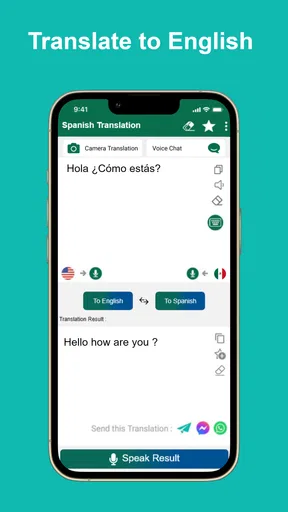
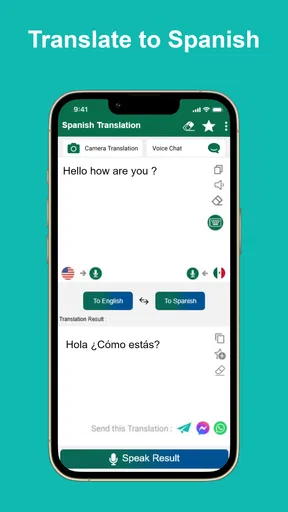
The first thing you’ll notice when you download Spanish English Translator is its sleek and user-friendly interface. It’s like the app knows you don’t have time to mess around with complicated menus. Once you open it up, you’re greeted with a straightforward option to start translating. Just type in the text, choose your language pair, and voilà! You’ve got your translation.
What I loved here is the simplicity. There’s no clutter, no unnecessary buttons that make you scratch your head. You know exactly what to do, even if you’re using it for the first time. And if you’re someone who’s always on the go, the quick access makes it perfect for those spontaneous moments when you just need a translation pronto.
Features That Stand Out
So, what makes this app special? Let me give you a rundown of its standout features.
- Instant Translation: It’s fast, like blink-and-you-miss-it fast. Type in your phrase, and within seconds, you get your translation.
- Voice Input: Too lazy to type? No worries, just speak into your phone. The app’s voice input feature is surprisingly accurate and handles various accents pretty well.
- Offline Mode: This is a lifesaver. No internet? No problem. You can download languages for offline use, which is perfect when you’re in a remote area or trying to save on data.
- Phrasebook: Need some quick phrases for travel? The handy phrasebook has got your back with common phrases you might need in a pinch.
Using It in Real Life
Now, theory is great, but how does it fare in the real world? I took Spanish English Translator for a spin in various scenarios. Whether I was trying to decipher a menu at a Spanish restaurant or trying to translate an English email into Spanish, the app proved to be a reliable companion.
A useful habit with any translator is to keep the input short and specific. Instead of entering a whole story, I would split it into complete, simple sentences so the meaning is easier to follow and any awkward result is easier to spot. With a menu, for example, I would translate the item name and any unfamiliar description separately, rather than treating a long block of text as one phrase.
For a message I plan to send, I would also read the result from the other person’s point of view before copying it. If the translation changes a name, a date, a quantity, or the tone of a request, I would revise the original sentence and try again. This small check is more useful than assuming a fluent-sounding result is automatically precise.
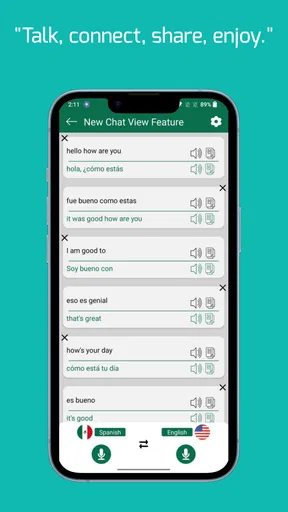
One cool moment was during a conversation with a Spanish-speaking friend. Instead of doing the awkward "let me Google that" shuffle, I simply whipped out the app and translated a couple of tricky phrases on the spot. It turned a potentially confusing chat into a smooth and enjoyable exchange.
Making offline help dependable
The offline option is most valuable when I prepare before losing a connection. I would check that the languages I need are ready while I still have reliable internet, then test a few basic phrases before leaving. That way, I am not discovering at a station, in a rural area, or inside a building with poor reception that I have not set things up as expected.
Offline translation is also a trade-off, not a magic replacement for every online lookup. It can be a practical fallback for essentials such as asking where something is or understanding a short notice, but I would keep high-stakes wording simple and verify it when possible. If phone storage is tight, I would prioritize the language resources I am likely to need rather than downloading material casually and forgetting about it.
A realistic travel use is arriving at a café and wanting to ask whether a dish contains an ingredient I avoid. I could use a short, direct question as a starting point, but I would not treat an automated translation as a safety guarantee for an allergy. I would show the question to staff, clarify the answer, and use another reliable source if the risk is serious. The app can help start communication; it cannot remove the need for care.
When the simple approach has limits
Voice input can be handy when my hands are occupied, but it is not always the best choice in a noisy place or when names and local expressions matter. In those moments, typing a short sentence gives me more control over what the translator receives. I would also avoid speaking a private message aloud in a shared space; convenience is not worth exposing information to people nearby.
Even with a quick interface, I would not assume every translation preserves register. A friendly phrase can become stiffer than intended, while slang may not carry across naturally. If I am writing to a colleague, landlord, or someone I do not know well, I would choose plain, polite wording in the original language and review the result rather than rely on humor, idioms, or sarcasm.
The app is also not the right choice for someone who needs several language pairs in one place, a tutor-led learning plan, or a dependable professional translation workflow. A broader translator may suit multilingual trips better; a course-based app is a stronger fit for regular study; and a human expert is the safer choice when exact wording has legal, medical, or financial consequences. Picking the right tool depends on the task, not on expecting one app to do everything.
Room for Improvement
Okay, so not everything is perfect. While Spanish English Translator is a solid app, there are a couple of areas where it could improve. For one, the app’s translations, while generally accurate, can sometimes miss the mark with idiomatic expressions or slang. But hey, language is complex, right?
Additionally, the offline mode, while super useful, does require a bit of storage space. So, if you’re running low on phone memory, you might need to manage your downloads wisely.
Who is likely to get the most from it?
I would recommend trying it if Spanish and English are the two languages you reach for most, especially for travel, quick reading, or everyday conversations where a rough understanding is enough to keep things moving. It may also help a student check a short phrase while studying, as long as they use a grammar resource to understand the construction rather than simply copying the answer.
It is less compelling if you translate only rarely and already have a dependable alternative at hand, or if you need a polished translation for publication or formal correspondence. The app’s appeal is its focused convenience, not a promise to replace language expertise. Since access is free, the sensible test is to try it with the kinds of short phrases you actually expect to use and see whether its results suit your needs.
Final Thoughts
All in all, Spanish English Translator is a handy tool for anyone dealing with Spanish and English languages. It’s not just for travelers; it’s great for students, professionals, or anyone who wants to bridge the communication gap effortlessly.
So, next time you’re in a language jam, or just want to practice your Spanish or English, give this app a whirl. It’s like having a pocket-sized translator that’s always ready to help you out!
For a final point of context, it is rated for Everyone, runs on Android 5.0 or later, and its current version is 4.10013. It was released on March 1, 2018, and has around 5,000 written reviews. Those details make it easy to identify the app and its broad intended audience, but my recommendation still comes down to the same practical question: does a direct Spanish-English lookup help with the situations you face?
Pros
- Accurate translation results.
- User-friendly interface design.
- Supports voice translation.
- Offline mode available.
- Quick text recognition.
Cons
- Limited regional dialect support.
- Occasional lag in voice input.
- Ads in free version.
- Requires internet for updates.
- Text limit for free users.
FAQs for Spanish English Translator
Is the Spanish English Translator app free to use?
Yes, the Spanish English Translator app is available for free download on both Android and iOS platforms. However, it may offer in-app purchases or ads to support its functionality. Users have the option to purchase a premium version to remove ads and access additional features.
Does the app require an internet connection to translate?
While the Spanish English Translator app offers offline functionality for basic translations, an internet connection is recommended for more accurate and comprehensive translations. Some advanced features like voice recognition or real-time translations may require being online to ensure high-quality results.
How accurate are the translations provided by the app?
The accuracy of translations in the Spanish English Translator app is generally high for common phrases and sentences. However, complex sentences or idiomatic expressions might not translate perfectly. It’s advisable to double-check important translations, especially for professional or academic purposes.
Can I use the app to translate spoken words?
Yes, the Spanish English Translator app includes a voice recognition feature allowing users to translate spoken words and phrases. This feature is particularly useful for travelers or when needing quick verbal translations. Ensure your device’s microphone is enabled and your internet connection is stable for best results.
Does the app support additional languages apart from Spanish and English?
Primarily focused on Spanish and English translations, some versions of the app may support additional languages. It’s best to check the app’s description or settings for a comprehensive list of supported languages. Updates to the app may also introduce more languages over time.


